Showing posts with label paypal. Show all posts
How to Verify PayPal without Credit Card or Debit Card
previously imagined verifying PayPal account using a bank account is very difficult but it is very easy. Usually we verify PayPal account using credit card or debit card. Verify PayPal using a debit card or credit card only takes a few hours the get your PayPal account verified. If you are using bank account to verify your PayPal account usually takes two to three days to make your PayPal account verified.
Do you want to try to verify your PayPal account using a Bank Account? Follow the following steps:
- Login to your PayPal account then Open “my account Tab”. Go to “Profile” then click “Add/edit Bank Account”. Click Add, complete all information needed.
- PayPal will send an email that contain how to confirm your bank account and get PayPal verified. Several day later PayPal will add two small deposits to your bank account. (Usually after two days)
- Check your bank account deposit, if you see two small deposit now you ready to verify your PayPal.
- Log in to your PayPal account and click Confirm bank account on the Account Overview page. Enter the two small deposit to the form and confirm. Now your PayPal has verified
Note: Verify PayPal using Bank account not available on all countries, available only on certain countries. If you haven’t received an email from PayPal but you see two small deposit on your Bank account you can continue verify your PayPal account.
Important: if you verified your PayPal using Bank account, your PayPal account cannot be used to shop online, can only be used to receive money and withdrawal
PayPal Limited Access Account: How to Avoid and the Solutions
The next day I use my PayPal to buy a domain on name.com. I do not read the notice PayPal that verified using bank account can be used for withdrawal only. Generally if your PayPal account limited you can not sending funds, Unable to close and terminate account, electronically transfer fund from your PayPal account and other.
Few reasons can make PayPal account limited are: Big size of withdrawals, Too Many refunds or chargeback, sum of money going through account, Credit/debit card that does not check out.
Tips to avoid your PayPal account from becoming limited:
- Do not open a brand new account and accept a large amount of money right after verification process.
- Don’t frequently change your account information.
- Do not add or remove credit cards on your account frequently.
- When you receive a large amount of money do not try to immediately withdraw the money, or send it to another account because you might mistrusted of having received fraudulent funds.
- While you should keep a little balance of your dollar in your PayPal account.
To solve if your PayPal account limited, login to your PayPal account and open “Resolution Center” on your PayPal account to remove limitations and complete all checklist item to restore the account by clicking resolve button.
Each PayPal case is usually different. On the case of my PayPal account limited, I must upload the following data:
- Confirm credit card
- Upload copy of your utility bill (proof of address).
- Upload copies of national ID card, driver’s license or passport.
How to Withdraw Money from PayPal to Bank Account
After I have a lot of money on my PayPal accounts how to I get the money from PayPal? You might ask that question when you already have a few dollars in your PayPal account. To get the money on your PayPal you can withdrawal the money to your bank account or to your card. To withdrawal into your bank account takes only 2-4 business days depending on your bank account and holiday schedule.
To get your money from PayPal to your bank account you should register your bank account number and it also require IFSCI code or Bank code where you have the account and the name on the bank account must match with the name on PayPal owner.
To Withdrawal your money from PayPal to Local Bank Account follows these steps:
To get your money from PayPal to your bank account you should register your bank account number and it also require IFSCI code or Bank code where you have the account and the name on the bank account must match with the name on PayPal owner.
To Withdrawal your money from PayPal to Local Bank Account follows these steps:
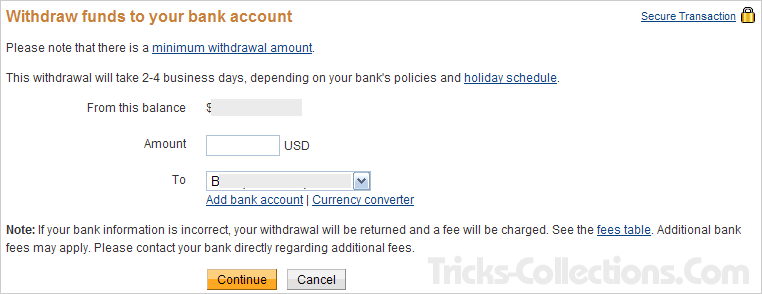
- Login to your PayPal account. On my account tab click withdraw. On clicked withdraw menu you’ll view this menu (view the below picture). On the options click “withdraw funds to your bank account”
- Type amount of money that you want to withdraw and select destination Bank account and then click submit. Note: you have registered your bank account before doing withdrawal. If you have not registered your bank account, please click the “add bank account” link.
- Now you can view your withdrawal review. If you sure with the review click submit button to complete withdrawal steps. You can receive the money on your bank account after 2-4 business days.
How to Create PayPal Account
Actually to create a PayPal account is easy and free. What is PayPal? PayPal is an e-commence business that allows you to payment and doing money transfer through internet (WIKIPEDIA). PayPal be used as back-end for credit card or Bank account info so with PayPal you can transfer money or shop securely through internet without revealing your credit card or bank account information. Another advantage using PayPal, PayPal can be used on more 190 country and regions worldwide.
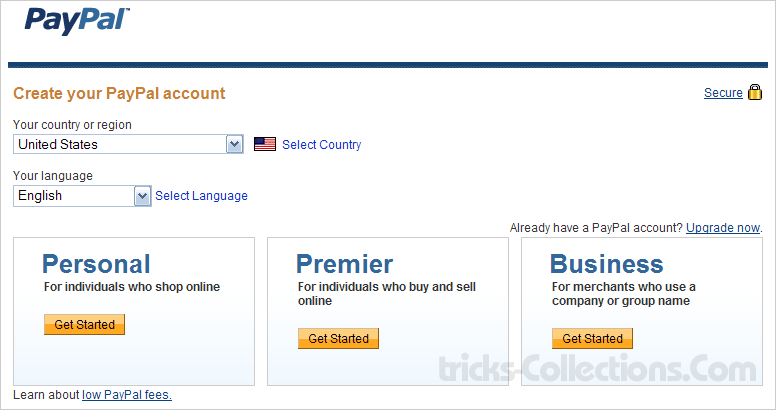
On the PayPal there are three account types; Personal, Premier, Business and now there new account type that is PayPal for student. What type of PayPal account do I need? If you use PayPal for sell some of stuff on the internet maybe you need business account type but if use PayPal only for transfer or receive money I suggest you create personal account type. No matter which account you choose because you can upgrade your account type at any time.
Screen-Shot comparison of account types on PayPal
How to Create an Account on PayPal
- No fees are required when creating an account on PayPal. It’s absolute free. To create an account on PayPal Click PayPal website here (ref). After clicked the link click “Sign Up Today” Link.
- Choose you country or region, language and account type that you need.
- Complete the form. You must enter valid and correct data in accordance with your identity card (National identify card, passport or driving license). After fill all field on the form Click “Agree and Create Account” to create your account. Tips: If you don’t have a credit cards uncheck “Link My Credit Card” option.
- Open the email you used to create PayPal account. You’ll receive an email from to confirm your account. Click confirmation link on the email. Once clicked the link, now you have an account on PayPal.